Introduction
DataFrugal is a cloud backup and data control platform designed for engineering, infrastructure, and operations teams. It provides a unified API surface, web interface, and command-line agent for orchestrating backup, retention, and governed access to data stored on secure object storage backends. DataFrugal operates as a control plane between your applications and underlying storage, focusing on reliable data protection workflows without exposing raw storage SDKs or processing file content. This documentation describes how to integrate, configure, and operate DataFrugal using the UI, REST APIs, and the df-agent for automation.
Rather than exposing raw storage APIs or requiring teams to manage low-level infrastructure details, DataFrugal provides:
- A usage-aligned pricing model designed around protected data volume, not individual API calls or users
- A unified API and command-line interface that enables consistent, automation-friendly data protection workflows across environments
- Centralized visibility and control over protected data using metadata-based insights, without inspecting or processing data content
DataFrugal is designed for engineering, infrastructure, and operations teams that need reliable backup, retention, and governed access to data—without turning storage management into an application concern.
What is DataFrugal?
DataFrugal is a cloud backup and data control platform designed for engineering, infrastructure, and operations teams.
It provides a structured, policy-driven control plane for protecting, retaining, and accessing data stored on secure object storage backends — without exposing raw storage SDKs or requiring teams to manage low-level cloud primitives.
DataFrugal can be used independently or integrated into existing application and system workflows through APIs, the df-agent, and a centralized web interface.
Common use cases include Database backups, VM backups, log archival, compliance snapshots, and long-term data retention. Across these scenarios, DataFrugal provides:
- Usage-aligned pricing based on protected data volume, not per-user licenses or individual API calls
- Centralized visibility and control using metadata-based insights, without inspecting or processing data content
- Policy-driven versioning and retention for reliable recovery and governance
- Enterprise-grade security controls including encryption at rest and in transit, role-based access, and network restrictions
- Large object support for handling individual objects up to 5 TB through platform-managed transfers
With a role-aware UI for operational visibility and REST APIs plus command-line tooling for automation, DataFrugal enables teams to manage backup and retention workflows efficiently — without turning storage management into an application concern.
Key Features & Benefits
- Unified Visibility Across Protected Data: Centralized, metadata-based visibility into protected data across systems, services, and automated workflows — without inspecting data content.
- Usage-Aligned Pricing Model: Pricing scales with the volume of data protected rather than per-user licenses or individual API calls.
- Enterprise-Grade Security Controls: Encryption at rest and in transit, role-based access control, organization- scoped boundaries, and network-level restrictions.
- Role-Aware Administrative Control: Centralized management of users, roles, ownership, and usage visibility through a single policy-driven control plane.
- Secure, Controlled Access Across Environments: Browser-based UI for operational visibility combined with APIs and df-agent support for automation and system-level workflows.
- Policy-Driven Versioning and Retention: Automatic retention of historical object versions based on defined policies, enabling reliable recovery and governance.
- Metadata-Based Search and Discovery: Search and organize protected data using indexed metadata, labels, and source context — without content inspection.
- Built-In Data Protection and Access Controls: Preventive controls that restrict external sharing and reduce exposure through architectural enforcement rather than reactive monitoring.
- Large Object Support: Reliable handling of individual objects up to 5 TB through platform-managed transfers, without exposing underlying storage SDKs.
Getting Started
Welcome to DataFrugal — a cloud backup and data control platform designed for engineering, infrastructure, and operations teams.
This section helps you set up your organization, configure access, and integrate DataFrugal into your environment using the web UI, APIs, or the df-agent.
Getting Started with DataFrugal
DataFrugal supports multiple onboarding paths depending on how your organization manages identity, billing, and cloud infrastructure. All onboarding flows result in a policy-governed environment for protecting and retaining data.
1. Organization-Based Onboarding (Recommended)
An administrator creates an organization, selects a subscription plan, and configures the preferred storage backend and region.
Additional users and service identities can be added using role-based access controls, with permissions scoped according to organizational policies.
This onboarding model is recommended for production workloads, compliance requirements, and long-term data retention.
2. API and Automation-First Onboarding
Infrastructure teams integrating DataFrugal into existing systems can onboard once and extend usage through APIs and the df-agent.
This approach is commonly used for CI/CD pipelines, scheduled backups, and system-generated data workflows.
3. Azure Marketplace Subscription
Organizations running workloads on Microsoft Azure can subscribe to DataFrugal via the Azure Marketplace to align billing with existing cloud accounts.
Subscribing through the marketplace ensures unified billing and avoids duplicate charges across platforms.
For step-by-step setup instructions, see the Getting Started Guide. Additional details are available in the FAQs, or contact support@datafrugal.com.
How to Set Up Your DataFrugal Environment
DataFrugal onboarding is organization-first and designed for production-grade backup, retention, and governed data access.
The setup process establishes an organization, assigns roles, configures the storage backend and region, and enables access through the UI, APIs, or df-agent.
Overview of the Setup Flow
- Create a DataFrugal account using your organization’s identity provider (email/password, Google, or Microsoft login).
- Accept the platform terms and receive a default role based on organizational policy.
- Create or join an organization. Existing organizations may invite users or service identities using role-based access controls.
- Select a subscription plan aligned with your data protection needs. Usage-based charges apply based on protected data volume.
- Choose the preferred storage backend and region (for example: Mumbai, Singapore, Virginia).
- Complete the organization setup and billing configuration.
- Access the DataFrugal dashboard to begin protecting data using the UI, REST APIs, or df-agent.
Automation & System Integration
For infrastructure-driven workflows, DataFrugal can be integrated using REST APIs or the df-agent without additional UI interaction. This approach is commonly used for scheduled backups, CI/CD pipelines, and system-generated data.
Detailed examples are available in the API documentation and df-agent guide.
For billing-related onboarding via Microsoft Azure, organizations may subscribe through the Azure Marketplace to align charges with existing Azure accounts.
Understanding the Dashboard
Main Dashboard View
The Main Dashboard serves as the default landing view where users can manage their files and folders. This central interface allows you to perform core actions related to file storage, such as uploading, organizing, and performing quick actions on your documents.
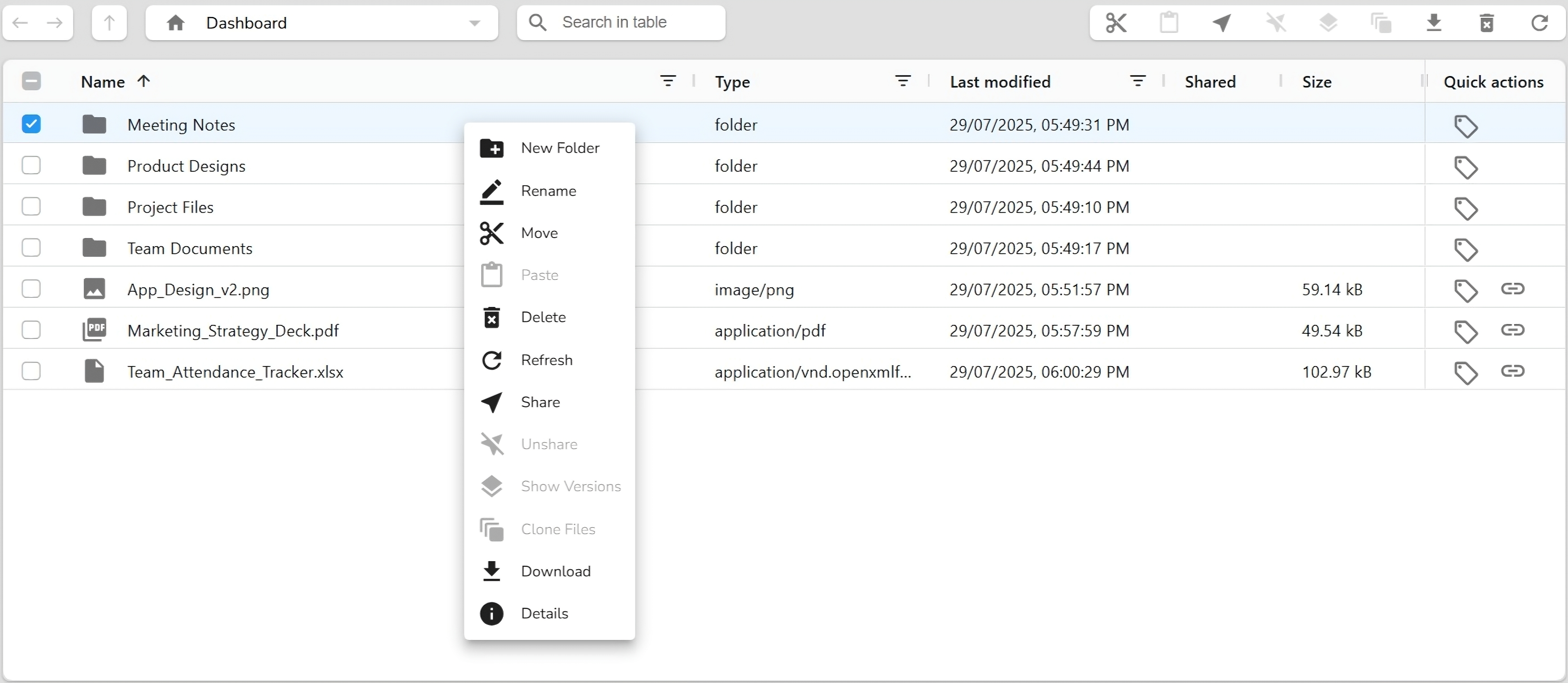
- Upload files by dragging and dropping them directly
- Create new folders to organize your data
- Use quick actions like Rename, Move, Delete, Share, and Refresh
- Search for files or filter them by type, name, or modification date
This view provides full access to storage functionalities, enabling users to manage and interact with their private data effectively.
Shared Items View
The Shared view displays all folders that others have shared with you. This section helps you collaborate with teammates or external users by keeping all shared resources in one accessible location.
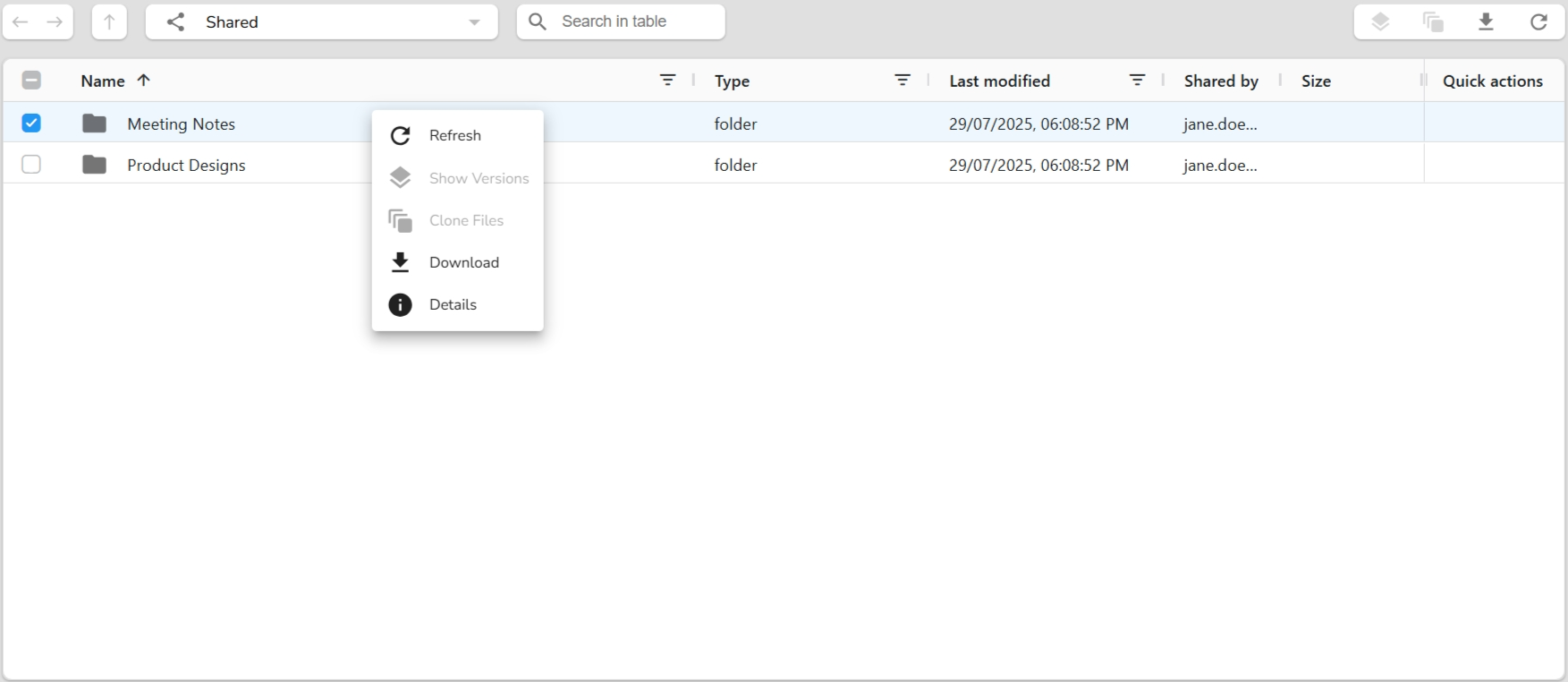
- View items shared with your account
- Use actions like Refresh, Download, Clone, and View Details
- Identify the sharer via “Shared by” column
Only shared folders appear here. If no files are shared yet, this view will remain empty until someone shares a folder with you.
Restore Items View
The Restore dashboard displays all previously deleted items—folders or files that can still be viewed or acted upon. This view helps retrieve deleted content without immediately restoring it.
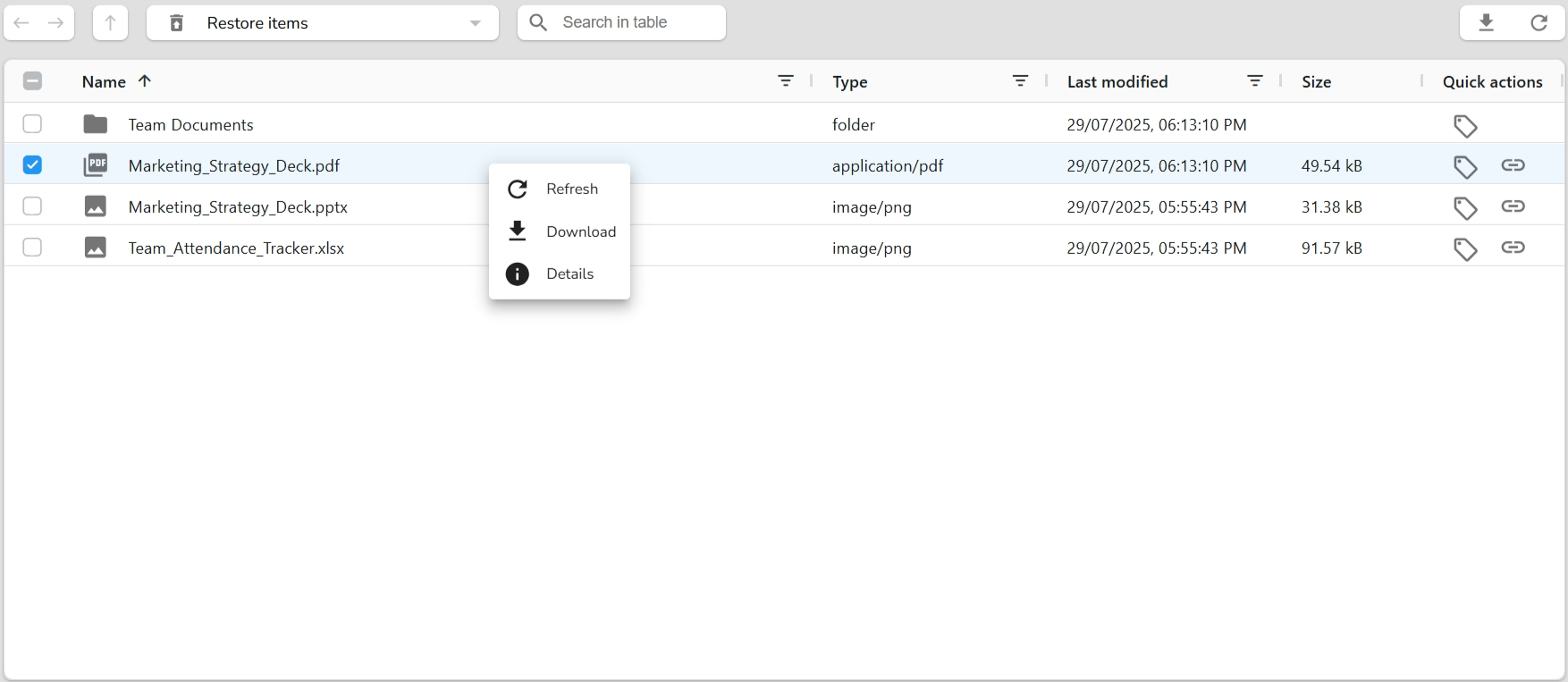
- Browse all deleted folders and files.
- Use Refresh to sync the latest deleted records.
- Download deleted files before permanent removal..
- View Details of any deleted item.
- Use search and filter tools to quickly locate deleted data.
This interface is helpful for reviewing deleted items without restoring them, giving you visibility and control over what's been removed from your drive.
Role-Based Access Control (RBAC)
DataFrugal uses a role-based access control (RBAC) model to ensure users and service identities can only access data and operations required for their responsibilities.
Roles define permissions across data access, administration, billing, and operational visibility. Dashboards and available actions are automatically scoped based on assigned roles.
Supported Roles
- Admin – Manages organizational configuration, access policies, users, and data governance. Limited access to billing.
- Member – Performs operational tasks and accesses permitted data and reports. No administrative or billing privileges.
- Billing – Manages subscriptions, invoices, and usage reporting. No access to data governance or user administration.
Administrative Capabilities
Admin Role
The Admin role governs organizational setup and access policies. Admins are responsible for defining who can access data and how it can be used.
- Organization Management – Configure organization details, ownership, and access boundaries.
- Role & Policy Management – Assign roles, define access scopes, and manage RBAC policies.
- Access Delegation – Grant scoped access to users or service identities for controlled data access.
- Security Controls – Manage IP allowlists, access restrictions, and governance settings.
Member Capabilities
The Member role is designed for operational users and systems that interact with protected data within defined access scopes.
- Data Operations – Upload, download, and access data within assigned permissions.
- Operational Visibility – View reports and dashboards relevant to assigned data and workflows.
Billing Capabilities
The Billing role is scoped to financial and usage oversight without access to operational data or administrative controls.
- Subscription Management – View and manage active plans and billing methods.
- Invoice & Payment Access – View invoices and payment history.
- Usage Reporting – Access usage and cost-related reports for financial tracking.
Quickstart Guide - API Access
Jumpstart your integration with DataFrugal using our
developer-friendly REST API. Visit the
API Access section for essential
curl examples to help you get up and running
quickly. Learn how to create folders, upload files using
Multipart Upload, and automate key operations in your data
pipeline—all through simple and secure API calls.
Usage Overview
DataFrugal provides secure, controlled mechanisms for uploading, downloading, accessing, and duplicating data using both the web interface and automation-friendly tooling.
The platform is designed to support operational workflows for engineering and infrastructure teams while remaining intuitive for users who prefer a visual interface.
Uploading Data
Data can be uploaded securely using the web interface or the command-line agent. Uploads are encrypted in transit and handled using resumable, chunked transfers where applicable.
1. Upload via Web Interface
Use the DataFrugal dashboard to upload files or folders using drag-and-drop or file selection. Upload progress and errors are clearly surfaced in the interface.
2. Upload via Command-Line Agent
The df-agent enables uploads from the terminal and is
suitable for automation, batch transfers, and scheduled jobs.
3. Upload Failure Handling
Failed uploads are reported with descriptive error messages. Partial uploads can be retried without restarting the transfer, depending on the operation and file size.
Downloading Data
Data can be downloaded through the UI, the command-line agent, or generated cURL commands, depending on access permissions.
1. Download via Web Interface
Users can download permitted files or folders directly from the dashboard. Version awareness and integrity checks are applied automatically.
2. Download via Command-Line Agent
Infrastructure and DevOps teams can download data using the
df-agent for automation and system-level workflows.
3. Download via cURL
Secure, time-bound cURL commands can be generated from the UI to allow direct file downloads from a terminal. Each command includes a pre-validated, short-lived access token and is intended for one-time, user-initiated execution rather than automated or unattended workflows.
1. Access Delegation via UI
Administrators and authorized users can grant access to folders through the dashboard. Access is scoped and auditable.
2. Access Delegation via CLI
The command-line agent can be used to grant or consume scoped access programmatically, enabling system-to-system workflows.
Common cURL Actions
DataFrugal provides pre-generated cURL templates for common operations such as uploads, downloads, and authenticated access. These commands can be copied directly from the UI for scripting and automation.
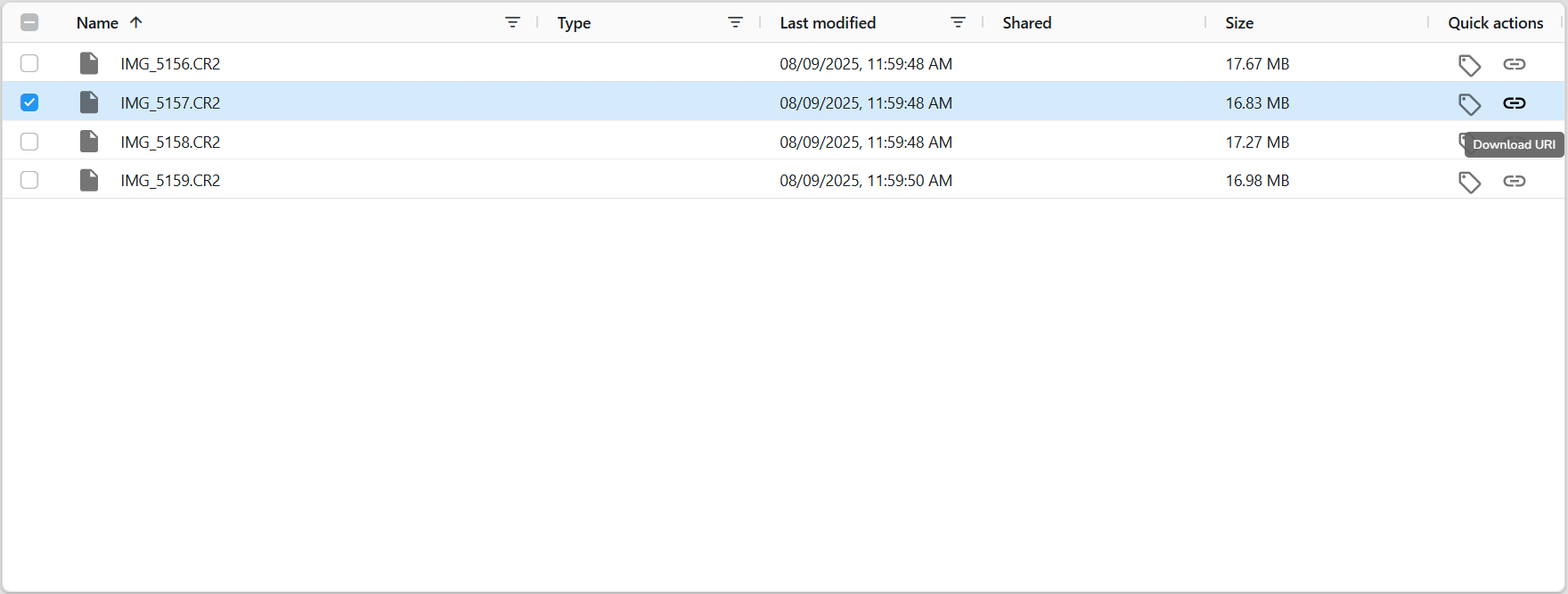
Clone
Clone creates an independent copy of a file that has been shared with you, allowing you to take ownership and manage it within your own workspace.
When a clone is created, a new object is generated under the current user’s ownership and becomes visible in their dashboard. The cloned data is no longer dependent on the original owner’s access permissions.
Clone is designed for controlled duplication within the same environment and does not perform cross-region, cross-vault, or infrastructure-level replication.
Integrations
DataFrugal is designed to integrate into enterprise environments through APIs, command-line tooling, and identity-aware access controls. It acts as a control layer for backup, retention, and governed data access workflows without exposing raw storage SDKs.
df-agent (Command-Line Agent)
df-agent is a Linux-compatible CLI tool that interacts with
DataFrugal using authenticated APIs. It is designed for automation,
system-to-system workflows, and scheduled backup operations.
- Supports object-level operations such as upload, download, delete, and controlled access delegation
- Enables secure service-to-service access where one system or service account grants another scoped read or write access
- Designed for CI/CD pipelines, scheduled jobs, and infrastructure automation
- Uses secure HTTPS-based API authentication with configurable credentials
-
Built-in help available via
./df-agent --help
REST API Access
DataFrugal exposes a RESTful API for integrating backup, retention, and controlled data access workflows into applications and systems.
- Endpoints for object operations, metadata management, and access delegation
- Supports scoped access between services using role- and policy-based controls
- Interactive Swagger UI for exploration and testing
- Secure token-based authentication
- Designed for automation and system-to-system integration
Identity Provider Integration
DataFrugal integrates with external identity providers for authentication, allowing organizations to manage access using existing identity systems.
- Supports Google and Microsoft OAuth-based authentication
- Organization-scoped and role-based access boundaries
- Suitable for both human users and service identities
Backup Tool Integration
DataFrugal can be integrated with external backup and scheduling tools by
invoking APIs or df-agent as part of existing workflows.
- Commonly used with tools such as Bacula for orchestrated backups
- Enables secure, HTTPS-based data transfer between systems
- Supports controlled access where downstream systems can read protected data without broad permissions
Security and Access Controls
- Role- and policy-based access delegation for users and service accounts
- Network-level restrictions such as IP allowlists
- Encryption at rest and in transit using industry standards
- Support for customer-managed encryption key configurations where applicable
These integrations allow DataFrugal to support enterprise-grade system-to-system data sharing, automation, and backup workflows while maintaining strict access boundaries and governance controls.
Billing & Plans
DataFrugal billing is designed for engineering and infrastructure teams, with pricing aligned to data protection usage rather than individual users or devices.
This section explains how subscriptions are structured, how usage-based charges are applied, and how organizations can manage billing and invoices through the platform.
Subscription Plans
DataFrugal plans combine a fixed platform subscription with usage-based charges based on the volume of data protected.
Subscription tiers differ by included capabilities and supported deployment options. Detailed rate cards and backend-specific pricing are available upon request.
For an overview of available plans and included capabilities, visit the Pricing page.
Usage and Charges
Usage is measured periodically based on protected data volume and operational activity. Pricing scales predictably as data grows and does not depend on the number of users or automation agents.
Invoice Management
Administrators can view invoices, payment history, and billing details directly from the DataFrugal dashboard.
For assistance with billing updates such as tax information, billing contacts, or invoicing questions, the DataFrugal support team is available to help.
For detailed pricing, backend-specific charges, or custom billing arrangements, please refer to the Pricing FAQ or contact support.
FAQ
For more information, visit the full FAQ section at www.datafrugal.com.
Support
Need help or have a question? We’re here to support you:
- Email us:support@datafrugal.com
- Want a faster way to reach us? Just fill out our contact form and we’ll get back to you shortly.
Feature Requests
Have ideas to improve our platform? We welcome your suggestions and prioritize them based on demand and feasibility.
Submit a Support Ticket
For technical issues, bug reports, or assistance, please submit a ticket using our online support form.